There's no USB device library for STM32F3-Discovery published by STM. But it turns out we can use the library for other EVAL boards -
STSW-STM32081STM32F10x and STM32L1xx USB full-speed device library. There's also a bunch of examples that go with this library, but they require some magic to work with STM32F3-Discovery hardware. They don't work out of the box. No worries, I'll teach you how to cast those spells.
Some basic information on projects structure that I use and links to resources can be found in these posts:
Links to USB resources on STM website
Creating a new project for STM32F3-Discovery in IAR from scratch
Let's go. Create new workspace, add Composite device example project from STM32_USB-FS-Device_Lib_V4.0.0 library. Create new configuration for STM32F3-Discovery (
Project->
Edit Configurations, press
New..., type name STM32F3Discovery, select STM32303C_EVAL configuration as a basis, press
OK). Make sure
STM32F3Discovery configuration is active.
In file
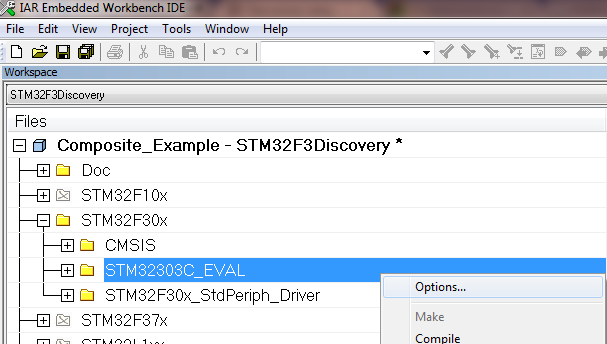
explorer, expand STM32F30X group, right click on STM32303C_EVAL group and select Options...
Tick Exclude from Build. Click OK.
In the same
STM32F30X group, create a new group STM32F3_Discovery. You now need to add all
*.c files from STM32F3_Discovery folder which is a part of STM32F3-Discovery
firmware. There is no Discovery libraries in USB-FS-Device library!
Now right
click on the project name in file explorer and select Options, then select
C/C++ compiler category and Preprocessor tab. Delete the three paths that are
for Eval board:
$PROJ_DIR$\..\..\..\Utilities\STM32_EVAL
$PROJ_DIR$\..\..\..\Utilities\STM32_EVAL\Common
$PROJ_DIR$\..\..\..\Utilities\STM32_EVAL\STM32303C_EVAL
Add path to
the folder where Discovery library is, for me it is:
$PROJ_DIR$\..\..\..\..\..\F3_projects\Utilities\STM32F3_Discovery <- Change this to fit your system setup!!!
Also, add
the following define: USE_STM32F3_DISCOVERY. Close the window.
Now
you have to modify the code:
1. File
platform_config.h:
Before
|
After
|
#elif defined (USE_STM32303C_EVAL)
 #include "stm32f30x.h"
 #include "stm32303c_eval.h"
 #include "stm32303c_eval_spi_sd.h"
#endif
|
#elif defined (USE_STM32303C_EVAL) || defined (USE_STM32F3_DISCOVERY)
 #include "stm32f30x.h"
 #if defined (USE_STM32F3_DISCOVERY)
  #include "stm32f3_discovery.h"
  #define Button_KEY BUTTON_USER
  #define Mode_EXTI BUTTON_MODE_EXTI
  #define LED1 LED5
  #define LED2 LED6
  #define KEY_BUTTON_EXTI_LINE USER_BUTTON_EXTI_LINE
 #else
  #include "stm32303c_eval.h"
  #include "stm32303c_eval_spi_sd.h"
 #endif //#ifdef (USE_STM32F3_DISCOVERY)
#endif
|
2. FIle
mass_mal.c.
As this example is using SD card which is available on EVAL boards
and we don't have that luxury on Discovery, I just mask out every function body
in this file returning MAL_OK status. You should do it for every function! The
example is just for one:
Before
|
After
|
uint16_t MAL_Init(uint8_t lun)
{
  uint16_t status = MAL_OK;

  switch (lun)
  {
    case 0:
      Status = SD_Init();
      break;
#ifdef USE_STM3210E_EVAL
    case 1:
      NAND_Init();
      break;
#endif
    default:
      return MAL_FAIL;
  }
  return status;
}
|
uint16_t MAL_Init(uint8_t lun)
{
#ifndef USE_STM32F3_DISCOVERY
  uint16_t status = MAL_OK;

  switch (lun)
  {
    case 0:
      Status = SD_Init();
      break;
#ifdef USE_STM3210E_EVAL
    case 1:
      NAND_Init();
      break;
#endif
    default:
      return MAL_FAIL;
  }
  return status;
#else
  return MAL_OK;
#endif //#ifndef USE_STM32F3_DISCOVERY
}
|
3. File
stm32_it.c
Before
|
#if defined(STM32L1XX_MD) || defined(STM32L1XX_HD)|| defined(STM32L1XX_MD_PLUS)
void EXTI0_IRQHandler(void)
#elif defined (STM32F37X)
void EXTI2_TS_IRQHandler(void)
#else
void EXTI9_5_IRQHandler(void)
#endif
|
After
|
#if defined(STM32L1XX_MD) || defined(STM32L1XX_HD)|| defined(STM32L1XX_MD_PLUS) || defined(USE_STM32F3_DISCOVERY)
void EXTI0_IRQHandler(void)
#elif defined (STM32F37X)
void EXTI2_TS_IRQHandler(void)
#else
void EXTI9_5_IRQHandler(void)
#endif
|
After this
is done, compile&download this firmware to STM32F3-DIscovery, then plag the
USB cable to USER USB connector. Open Control Panel, then Device Manager,
locate the USB Input Device with exclamation mark on it and update drivers from
Windows Update for the device. After drivers are installed, Windows will
recognize the device as Mass Storage + HID device.

Mass Storage will definitely
not work. Windows will see it, but whatever you try to do with it, it will
yell at you "Incorrect function"! HID will be working partially with
STM HID Demonstrator - three of the LEDs will be working. To fix HID
functionality you'll have to modify usb_des.c/h files to make USB descriptor
match the actual hardware. If you really need this and fail to do it yourself,
ask me in comments and I'll post HID descriptor that works with the Discovery
button, four of its LEDs and one ADC channel.
And that's it. It's simple, I told you (at least when you have such a howto at your hands).
Click some banners, that helps. Thanks!