Showing posts with label STM32. Show all posts

Sunday, March 27, 2016

Hacking Honda Odyssey 2007 RES DVD-player: part 2

Part 1: Overview
Part 2: Hardware (This part)

Hardware


I finally built a PCB that works great and  even helped me to track down a nasty bug (took me a while, too. Hang on here with me, I'm actually going to tell you about it because it's fun).
But now, hardware.



Saturday, March 5, 2016

Hacking Honda Odyssey 2007 RES DVD-player: part 1

Part 1: Overview (this part)
Part 2: Hardware

Infotainment/NAVI system in Honda Odyssey 2007 is a huge monster – it has a luxury audio unit with 6 CD changer, a DVD-player, large NAVI screen in the dashboard, dashboard and steering wheel controls, rear screen with controls, IR remote and IR headphones. Awesome, isn't it?

Well, the problem is that we live in 2016 and it really does suck when you are stuck with the only choice between CDs and DVDs. If you want MP3, computer video, USB input, Bluetooth or anything else – your only option is the AUX input (composite video + stereo audio). It's definitely something, but if you are a maker, you can't be really satisfied with it, can you?

So I thought – why don't I look into how the hell this DVD works and if it would be possible to replace it with something more interesting and flexible – think a Raspberry PI or alike.


Sunday, March 30, 2014

Generate STM32 MCU pin configuration automatically on MCU

Building a project for STM32F4-Discovery I realized it's really hard to keep track of all the pins as they get configured in different files all over the project. It's either keeping a separate list of assignments and functions (maybe using STM's cube software) or just going through source files every time.

Or maybe just having MCU report how pins are configured?

Here's what I managed to get out of my STM32F407VGT6:
==============================
SMT32F407VG Configuration
------------------------------
PA0     Input           LOW,  NO_PULL
PA1     Input           LOW,  NO_PULL

Saturday, April 13, 2013

USB composite (multi-interface) device with STM32F3-Discovery

There's no USB device library for STM32F3-Discovery published by STM. But it turns out we can use the library for other EVAL boards - STSW-STM32081STM32F10x and STM32L1xx USB full-speed device library. There's also a bunch of examples that go with this library, but they require some magic to work with STM32F3-Discovery hardware. They don't work out of the box. No worries, I'll teach you how to cast those spells.

Some basic information on projects structure that I use and links to resources can be found in these posts:
Links to USB resources on STM website
Creating a new project for STM32F3-Discovery in IAR from scratch

Let's go. Create new workspace, add Composite device example project from STM32_USB-FS-Device_Lib_V4.0.0 library. Create new configuration for STM32F3-Discovery (Project->Edit Configurations, press New..., type name STM32F3Discovery, select STM32303C_EVAL configuration as a basis, press OK). Make sure STM32F3Discovery configuration is active.

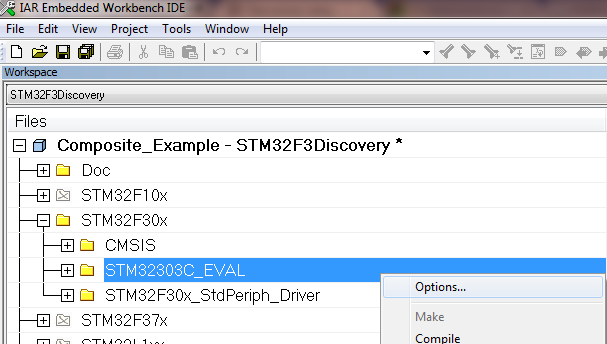
In file explorer, expand STM32F30X group, right click on STM32303C_EVAL group and select Options...

Tick Exclude from Build. Click OK.

In the same STM32F30X group, create a new group STM32F3_Discovery. You now need to add all *.c files from STM32F3_Discovery folder which is a part of STM32F3-Discovery firmware. There is no Discovery libraries in USB-FS-Device library!
Now right click on the project name in file explorer and select Options, then select C/C++ compiler category and Preprocessor tab. Delete the three paths that are for Eval board:
$PROJ_DIR$\..\..\..\Utilities\STM32_EVAL
$PROJ_DIR$\..\..\..\Utilities\STM32_EVAL\Common
$PROJ_DIR$\..\..\..\Utilities\STM32_EVAL\STM32303C_EVAL
Add path to the folder where Discovery library is, for me it is:
$PROJ_DIR$\..\..\..\..\..\F3_projects\Utilities\STM32F3_Discovery <- Change this to fit your system setup!!!
Also, add the following define: USE_STM32F3_DISCOVERY. Close the window.

Now you have to modify the code:

1. File platform_config.h:
Before
After
#elif defined (USE_STM32303C_EVAL)
 #include "stm32f30x.h"
 #include "stm32303c_eval.h"
 #include "stm32303c_eval_spi_sd.h"
#endif
#elif defined (USE_STM32303C_EVAL) || defined (USE_STM32F3_DISCOVERY)
 #include "stm32f30x.h"
 #if defined (USE_STM32F3_DISCOVERY)
  #include "stm32f3_discovery.h"
  #define Button_KEY BUTTON_USER
  #define Mode_EXTI BUTTON_MODE_EXTI
  #define LED1 LED5
  #define LED2 LED6
  #define KEY_BUTTON_EXTI_LINE USER_BUTTON_EXTI_LINE
 #else
  #include "stm32303c_eval.h"
  #include "stm32303c_eval_spi_sd.h"
 #endif //#ifdef (USE_STM32F3_DISCOVERY)
#endif

2. FIle mass_mal.c.
As this example is using SD card which is available on EVAL boards and we don't have that luxury on Discovery, I just mask out every function body in this file returning MAL_OK status. You should do it for every function! The example is just for one:
Before
After

uint16_t MAL_Init(uint8_t lun)
{
  uint16_t status = MAL_OK;

  switch (lun)
  {
    case 0:
      Status = SD_Init();
      break;
#ifdef USE_STM3210E_EVAL
    case 1:
      NAND_Init();
      break;
#endif
    default:
      return MAL_FAIL;
  }
  return status;
}

uint16_t MAL_Init(uint8_t lun)
{
#ifndef USE_STM32F3_DISCOVERY
  uint16_t status = MAL_OK;

  switch (lun)
  {
    case 0:
      Status = SD_Init();
      break;
#ifdef USE_STM3210E_EVAL
    case 1:
      NAND_Init();
      break;
#endif
    default:
      return MAL_FAIL;
  }
  return status;
#else
  return MAL_OK;
#endif //#ifndef USE_STM32F3_DISCOVERY
}

3. File stm32_it.c
Before
#if defined(STM32L1XX_MD) || defined(STM32L1XX_HD)|| defined(STM32L1XX_MD_PLUS)
void EXTI0_IRQHandler(void)
#elif defined (STM32F37X)
void EXTI2_TS_IRQHandler(void)
#else
void EXTI9_5_IRQHandler(void)
#endif

After
#if defined(STM32L1XX_MD) || defined(STM32L1XX_HD)|| defined(STM32L1XX_MD_PLUS) || defined(USE_STM32F3_DISCOVERY)
void EXTI0_IRQHandler(void)
#elif defined (STM32F37X)
void EXTI2_TS_IRQHandler(void)
#else
void EXTI9_5_IRQHandler(void)
#endif


After this is done, compile&download this firmware to STM32F3-DIscovery, then plag the USB cable to USER USB connector. Open Control Panel, then Device Manager, locate the USB Input Device with exclamation mark on it and update drivers from Windows Update for the device. After drivers are installed, Windows will recognize the device as Mass Storage + HID device.

Mass Storage will definitely not work. Windows will see it, but whatever you try to do with it, it will yell at you "Incorrect function"! HID will be working partially with STM HID Demonstrator - three of the LEDs will be working. To fix HID functionality you'll have to modify usb_des.c/h files to make USB descriptor match the actual hardware. If you really need this and fail to do it yourself, ask me in comments and I'll post HID descriptor that works with the Discovery button, four of its LEDs and one ADC channel.
And that's it. It's simple, I told you (at least when you have such a howto at your hands).
Click some banners, that helps. Thanks!

Friday, March 29, 2013

Links to USB resources on STM website

I think my older post Some resources for STM32 USB device programmers no longer represents how I look at USB firmware development for STM32, so...

This is just a list of links to USB resources on STM website. I'll use it as a reference for myself, so this post will be updated. The need for me to create this post is because STM finally succeeded in their quest to make any info unsearchable on their website.
If you think anything is missing, please let me know.
I'll split this by Discovery boards, F3 and F4, so apologies in advance.

Thursday, March 21, 2013

STM32 tools: New MicroXplorer generates the STM32 pinout initialization code

While I'm still very angry with STM for what they've done to all the community efforts by breaking, again, all the links on their *new* website rendering all our howtos to useless texts, here's a piece of *presumably* great news: MicroXplorer now is able to generate code. I haven't tried it though yet, so be the first to give it a go and describe your experience.

Saturday, February 2, 2013

Howto create a new project for STM32F3-Discovery in IAR from scratch (step-by-step)

Maybe everyone knows how to do it. I did not. I spent days, trying to understand the logic. It *seems* to me that I grasped it somehow, but I fail to see to what extent. But since it's working for me now, I hurry to write this down so I can always check back to this post and know how to start.

Prerequisites

So, what I have here is STM32F3-Discovery from STMicroelectronics. I also have IAR Embedded Workbench IDE installed. I had to fall back to IAR as CooCox IDE doesn't support STM32F3-Discovery and they don't tell when they are going to have it. This happens not the first time with them - STM32F4-Discovery still poorly supported and I'm not sure if STM32F0-Discovery is supported either. So I decided I'd go with IAR.

Tuesday, November 13, 2012

Some resources for STM32 USB device programmers


UPDATE: I will collect direct links to libraries and manuals here on this post: 

Links to USB resources on STM website


Well, some of the some are not for STM32 only.

First and the best I found this tutorial - "USB in a nutshell". I just started reading it, but it lloks like it's a must for a starter like me. Check this out:

Endpoints
Endpoints can be described as sources or sinks of data. As the bus is host centric, endpoints occur at the end of the communications channel at the USB function. At the software layer, your device driver may send a packet to your devices EP1 for example. As the data is flowing out from the host, it will end up in the EP1 OUT buffer. Your firmware will then at its leisure read this data. If it wants to return data, the function cannot simply write to the bus as the bus is controlled by the host. Therefore it writes data to EP1 IN which sits in the buffer until such time when the host sends a IN packet to that endpoint requesting the data. Endpoints can also be seen as the interface between the hardware of the function device and the firmware running on the function device.
All devices must support endpoint zero. This is the endpoint which receives all of the devices control and status requests during enumeration and throughout the duration while the device is operational on the bus.

Isn't that crisp and clear?

Ok, going further. If you play with STM32F4-Discovery like I do, it may be a pain in the neck to find a helpful resource. E.g. you can't find USB OTG library from the board's page. You can't find it through web search either. You can't even find it with search on www.st.com website. Geee, I almost gave up on this.

Here's how to find it. Go to main page (their main page!), click "Micros and Memories", click "Microcontrollers", click "STM32 - 32 bit ARM Cortex MCU", switch to "Resources" tab, Click "Firmware" and look for "STM32F105/7, STM32F2 and STM32F4 USB on-the-go Host and device library" (the link will soon be broken - best practices from ST. Really, guys - your Digital Marketing department suck. Try to find this library with the search on your own site!).

There's even manual for this library (and a good one. I think...). I have no idea how to find it on ST website, but this time google is very useful. Here's a direct link to UM1021 User Manual.
And the last thing is HID Demonstrator. I don't know what is that exactly, I just know that this is useful and I soon will need this. So may you. Thus, a step back in resources and click "Drivers". Look for "USB HID Demonstrator release 1.0.2"

Go read guys. It's gonna take you a LOOOOT of time. But I think it's kinda worth it.

Friday, August 17, 2012

Bug in STM32? TIM's One-pulse mode


Update: Apparently the issue was in how well I read documentation. Thanks to Foobear:
Hope you figured this out already, but TIM3 Doesn't have an RCR. You need to use TIM1 or maybe TIM12-17.


OLD text:

I just ran an experiment with an STM32F100RB6 and got a slightly discouraging result. Here's what I wanted - to have a timer to fire three times and stop automatically.

Tuesday, July 31, 2012

Correction on STM32 Micro Explorer configuration utility

I recently wrote about MicroExplorer from STMicroelectronics - STM32 visual configuration tool. And I put a hint there: "Hint 2: Manually selecting an input/output role for a pin (such as Open Drain Output) will prevent you from choosing a peripherial in the drop-down menue. The utility will not tell you that there's a conflict - it will just not allow you to choose a peripherial. So my advise is - select all the peripherials first and then start playing with inputs/outputs manually."


Luckily, this is not true. If there's a conflict, Micro Explorer shows you possible candidates for the conflict - on mouse over:
If you hold you mouse over a conflict sign, you'll see what's the problem
Happy configuration!

Cheers :-)

Sunday, July 1, 2012

First attempt to create a cheap CNC

Well, here's why I needed those servos: I somehow decided I could build a cheap CNC out of Dremel drilling station. I bought some metal part for about ten bucks and two servos for about twenty bucks a piece.

Saturday, June 30, 2012

Modifying servo for continuous rotation and adding digital encoder - part 2


Now we'll add encoding capabilities to the servo so it can report it's incremental or/and absolute position. I'll be using AS5040 - 10-bit Absolute Programmable Magnetic Rotary Encoder with Incremental, SSI, and PWM Output from ams (ex- austriamicrosystems and TAOS) with incremental mode on, but if you care to re-program the device, it can feed you step/dir data. And if you modify PCB you can also use absolute position (that can be read through SPI as well as PWM/analog output).

What you'll need:

Friday, June 29, 2012

Modifying servo for continuous rotation and adding digital encoder - part 1

I need servo motors with position feedback for a project. I chose to go with servos and later decided to integrate encoder right into servo - I've seen something like this before (e.g. here:  http://www.openservo.com/ )

As I need quite powerful servos, I chose all-metal Power HD High-Torque Servo 1501MG from Pololu. In part 1 I'll just document how I modified it for continuous rotation - it seems everyone did that at least once these days (well, not particularly everyone - my mom still hasn't done that).
Power HD 1501 Analog Servo

Thursday, June 14, 2012

MicroExplorer from STMicroelectronics - STM32 visual configuration tool

It's often a pain to properly connect different peripherials to an MCU, especially if the latter has rich remapping capabilities (that is definitely the case for STM32). I used to use MS Excel for playing with configurations for PICs but as I just started with STM32 it would be a nightmare to go through all the remapping info in Reference Manual and try to not assign the same pin for all the devices you want to connect your MCU to.

Luckily ST created a graphical tool for people like me.

Monday, May 28, 2012

Easy button debouncing technique for STM32

Yesterday I had to debounce a button on my STM32VL-Discovery. I did a quick search and found an amazing article on Hack A Day:

Debounce Code – one post to rule them all

This is a great collection of many approaches to button debounce. I didn't use any however (although I liked the integration technique very much) - I had just one button that may not even be pressed at all - so I didn't want to poll it or anything. Rather I went for external interrupt to detect the press itself.

Friday, May 11, 2012

Howto flash a DSO Nano v2 bootloader (STM32)

DSO Nano is a single channel scope/signal generator. I got mine from seeedstudio.com for just $89. The problem was, I fried signal generator and as it turned out also MCU by accidentally touching +12V rail. I bought a new MCU, soldered it to the board instead of the fried one and wondered how to flash firmware into it. So after a few days I came up with the following.